How to quickly apply for a free SSL certificate
If a website continues to use the HTTP protocol, it will not only be flagged as "Not Secure" by major browsers but will also directly negatively impact the website's search engine rankings. The exposure of plaintext data transmission further subjects enterprise and personal private information to immense leakage risks.
The core of achieving website encryption lies in obtaining a digital certificate issued by an authoritative body. Many novice webmasters and enterprise IT operations personnel often hesitate due to the high costs of commercial certificates; in fact, there is no need to add this extra cost burden. Next, we will provide a detailed introduction to specific channels for free SSL certificate application, helping you quickly build a solid security defense line for your website at zero cost.
Of course, a secure and fast website does not rely solely on SSL certificate encryption; it also requires the support of underlying servers and convenient platforms. As a cloud infrastructure service provider under EasyLink with over 12 years of industry experience, VMRack relies on its self-built Los Angeles data center and builds stable VPS environments based on high-performance AMD processors. Even more conveniently, the VMRack platform has built-in, comprehensive certificate application features. You can perform one-click operations directly within our console, bringing you a smooth and integrated O&M experience comparable to dedicated servers.
Free SSL Certificate Application Channels and Platform Selection
There are currently many reliable certificate issuance authorities on the market, and choosing the right channel is the first step toward a successful application. Among them, Let's Encrypt, as the world's largest non-profit certificate authority (CA), has become an industry standard due to its complete automation and broad browser compatibility. Furthermore, many mainstream cloud vendors at home and abroad provide users with convenient free application channels for single-domain certificates. VMRack provides users with certificate application functions for Let's Encrypt and ZeroSSL brands, and automatically renews certificates after they expire.
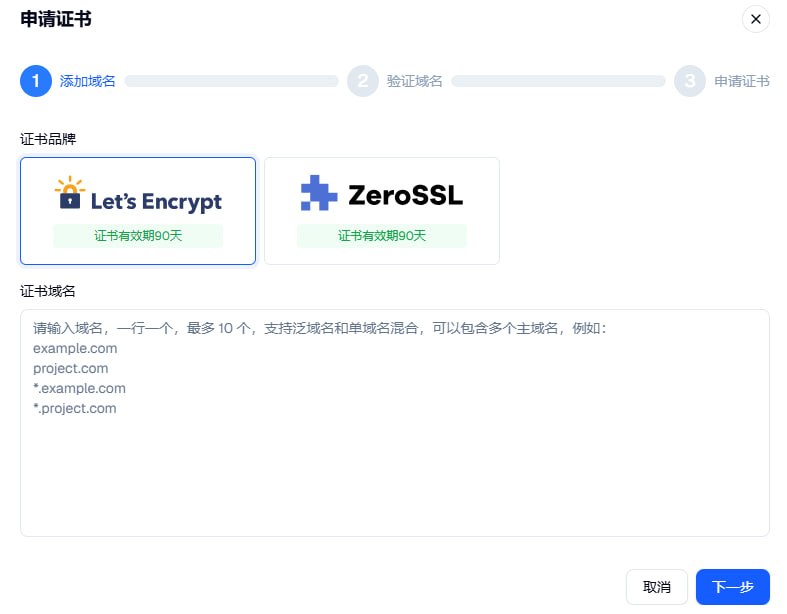
Faced with these organizations, many developers often wonder: How can I apply for an SSL certificate to ensure the highest efficiency and best compatibility? Generally speaking, if you pursue fully automated O&M, applying directly on the platform where you purchased your server is the best choice. The VMRack platform integrates this feature, allowing users to initiate an application with one click directly in the backend, eliminating the tedious steps of switching between different platforms and copying keys, which greatly improves O&M efficiency.
Regardless of the channel you choose, the encryption strength of the certificates applied for has no essential difference from paid certificates and can fully meet the compliance and security needs of the vast majority of websites. If you are deploying business using a VMRack VPS, you can directly use the platform's built-in features to complete the application. You can complete the SSL handshake instantly with extremely low latency, bringing a dual ultimate experience of security and speed to users in mainland China and around the world.
Free SSL Certificate Application Tutorial
To help everyone avoid unnecessary detours, we have summarized a standardized free SSL certificate application tutorial using the most common DNS verification and file verification methods. The core of the entire application process lies in proving to the certificate authority that "you have absolute control over the domain name." As long as you master this logic, applications on any platform can be solved easily.
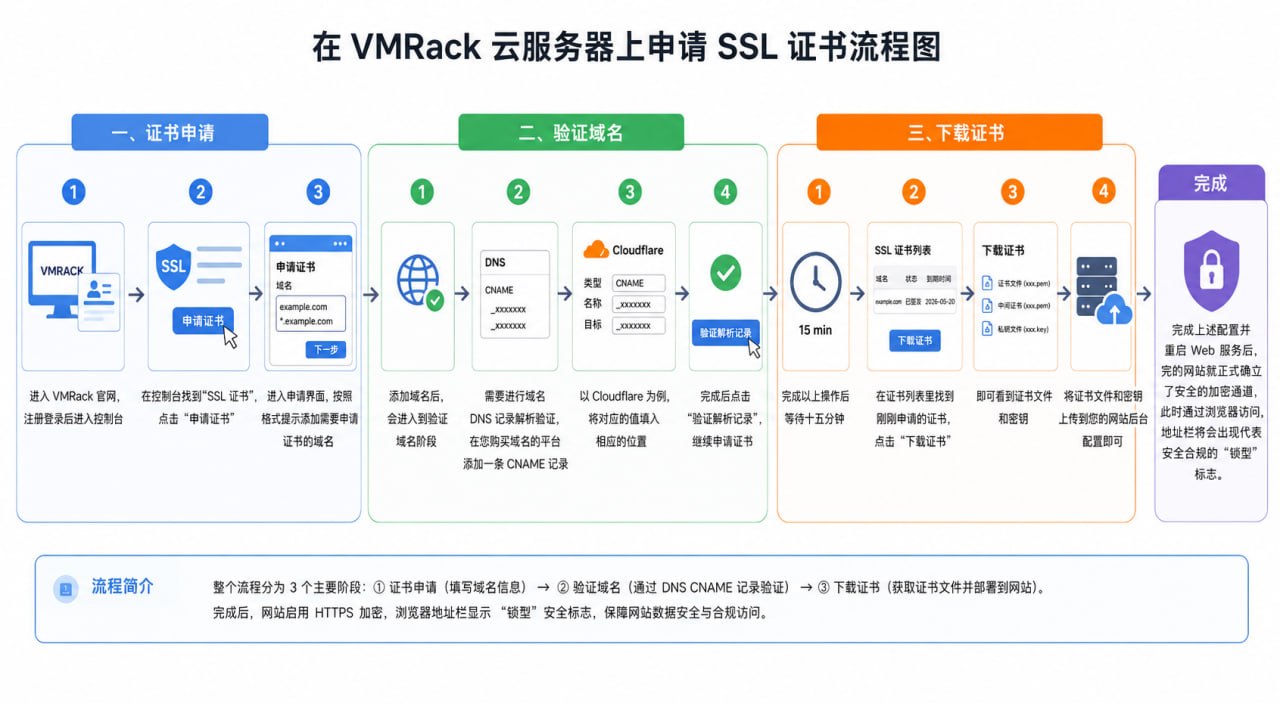
The first step is to submit the application request. You need to enter your domain name to be encrypted (e.g., www.yourdomain.com) on the selected platform (such as logging in directly to the VMRack console) and generate a Certificate Signing Request (CSR) according to the prompts. Next, enter the most critical domain ownership verification phase. You can choose to add a specified CNAME record in the domain's resolution panel (DNS verification), or upload a specific verification file to a designated folder in your website's root directory (file verification).
When the certificate authority's server successfully detects this CNAME record or verification file, the system will automatically issue your SSL certificate within a few minutes. At this point, you only need to log in to the platform to download the compressed package containing the certificate file and the .key private key file. On the cloud infrastructure platform self-developed by VMRack, thanks to our fully automated technical support and the multi-IPv4 network solutions of our self-built Los Angeles data center, you can extremely flexibly deploy these certificates to different network nodes and CDN edge servers.
Conclusion
In summary, applying for a free SSL certificate through compliant and reliable channels can not only save a large amount of operating expenses for enterprises and individual webmasters but also perfectly solve the problems of website transmission encryption and browser trust. We hope that the summary in this article will help you clarify the overall context of the application and successfully enable the "secure green lock" for your website. In this era of pursuing full-network encryption, choosing a stable, high-performance underlying server, combined with a free SSL certificate, will safeguard your online business and help your business move forward steadily in the cloud.

- Products
- VPS Hosting
- VPS HostingUnmetered
- Bare Metal
- GPU Rental
- CDNPublic Beta
- Custom CDN
- Object StoragePublic Beta
- TranscoderPublic Beta